


Bolt: Request a Ride
4.87.94K Reviews
App Specs
- Version
- CA.217.0
- Updated On
- License
- Free
- Downloads
- 100,000,000+
- Developer
- Bolt Technology
- Categories
- Maps & Navigation
- Platform
- Android, iOS
Screenshots


 Analysis by AppCompare
I find Bolt: Request a Ride most useful when I need a car without arranging one by phone or waiting at a taxi rank. It puts the request, pickup point, and journey details in one place, which can make an unfamiliar trip feel more manageable. That convenience is the app’s strongest case, though it depends on local driver availability and doesn’t make it the right choice for every journey.
Where a ride-hailing app earns its place
I think of Bolt as a practical option for the awkward gaps in a day: a late connection, luggage that makes a bus ride difficult, or a destination that is inconvenient to reach on foot. It is a free Maps & Navigation app from Bolt Technology, and its central purpose is arranging a ride rather than replacing a full public-transport planner. If I already know the destination, I can focus on getting there instead of comparing routes across several transit screens.
That distinction matters. A ride can be a comfortable door-to-door choice, but it may not be the fastest or least expensive way across town. For a familiar route with a direct bus or train, I would usually check public transport first. Bolt makes more sense when the convenience of a car is worth the trade-off, such as when I’m carrying shopping, travelling with someone who has limited mobility, or trying to avoid a long walk after dark.
Guides and Analysis on Bolt: Request a Ride
A more useful way to plan a pickup
The map is not just a place to tap and wait. Before requesting, I would check whether the pin is on the correct side of a divided road and whether the chosen spot is somewhere a driver can actually stop. At a busy station, shopping area, or large venue, a nearby side street or clearly identifiable entrance can be easier than the main doorway. A small adjustment before booking can save a confusing exchange once the car is close.
I’d also treat the fare estimate as a planning aid, not a promise that every trip will feel inexpensive. It helps me decide whether a ride fits the day’s budget before I commit, but the value depends on the route and the alternatives available at that moment. If cost is my main concern, I compare the estimate with a transit option and consider whether walking part of the way would solve the problem just as well.
Everyday situations where it helps
Picture leaving work later than planned with a laptop bag and groceries. A bus is still possible, but it means a walk to the stop and another from the destination. I can enter the destination, check the pickup pin, look at the estimate, and decide whether the shorter door-to-door trip is worth it. If I go ahead, seeing the driver’s progress helps me time the wait rather than standing outside wondering whether the request has been noticed.
Another useful case is meeting a friend somewhere unfamiliar. I can share the journey details with someone I trust, then use the driver and vehicle information to check that the arriving car matches what the app shows. These steps are sensible habits, not a reason to switch off attention: I still confirm the pickup and stay aware of the route. The app can make a trip easier to coordinate, but personal judgement remains part of travelling safely.
Worth Reading Before You Choose

EA SPORTS FC Mobile 26 Is a Bigger Football Game, but It Takes Time

Flipboard Shows What News Apps Must Do Beyond the Feed

Switching to Android Auto Means Rethinking Your Driving Routine

Google Calendar Makes a Crowded Week Easier to Manage

Ludo King Makes the Most of the Minutes Between Plans

Baby Panda World Brings Quick Play to Modern Phones, but Its Game Library Feels Busy
What it does well—and what it cannot solve
The clearest strength is the joined-up booking flow: destination entry, an estimated fare, driver progress, and a way to communicate about pickup instructions all sit within the ride process. That is more convenient than calling a cab and separately trying to explain where I am, especially when I’m somewhere busy. Cash and card payment choices can also suit different routines, although I would check the options available for my particular trip rather than assume every method will be offered in every place.
The main limitation is that an app cannot create a nearby driver where there are few drivers available. Waiting, pickup difficulty, and the usefulness of a ride-hailing service can vary with the location and time. If I’m on a strict schedule, I would leave room for the pickup rather than treat the map as a guarantee of arrival at a precise minute. And if I need a route with several stops, a transit connection, or a journey outside the areas where the service is active, a different transport choice may be a better fit.
Compared with the usual alternatives, Bolt sits between public transport and a traditional taxi. A bus or train is often better for a predictable, budget-conscious trip along a convenient route; a taxi booked by phone may suit someone who prefers speaking to a dispatcher or does not want to use an app. Bolt’s advantage is seeing the ride request and driver information together on a phone. Its drawback is the same dependence many app-based services have on smartphone access, connectivity, and local supply.
Getting Started with Bolt
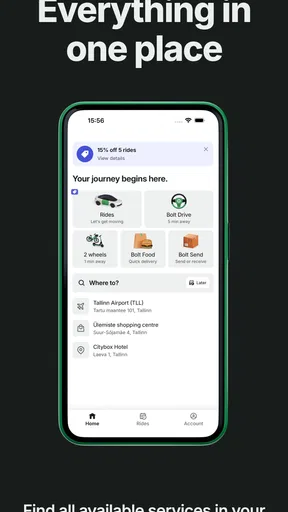
First things first, downloading Bolt: Request a Ride is a breeze. It's available on both Android and iOS, so no one's left out. Once installed, the setup is pretty straightforward—just pop in your details, and you're good to go. The user interface is sleek and intuitive, which means you won't be fumbling around trying to figure out how to book a ride.
Booking a Ride
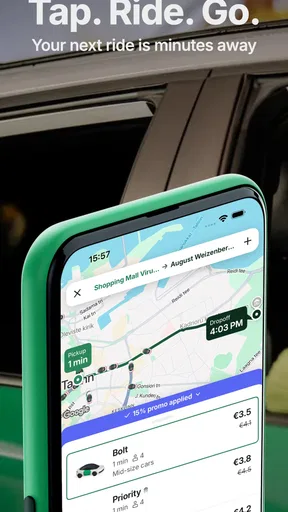
Booking a ride is as easy as pie. Just open the app, enter your destination, and watch as nearby drivers pop up on the map like magic. One feature I found particularly cool is the fare estimate. Before committing to the ride, you get a ballpark figure of what it's going to cost, which is super handy if you're budgeting your trips.
For a smoother booking, I recommend setting the pickup point deliberately instead of accepting the first pin without looking. In a crowded city centre, a driver may have trouble stopping directly outside a venue, and a pin placed on the wrong side of a road can make the meeting point unclear. I would choose a safe, accessible spot and use the in-app chat for a short, practical instruction if the entrance is hard to identify. That simple workflow is more useful than repeatedly moving the pin after a driver is already approaching.
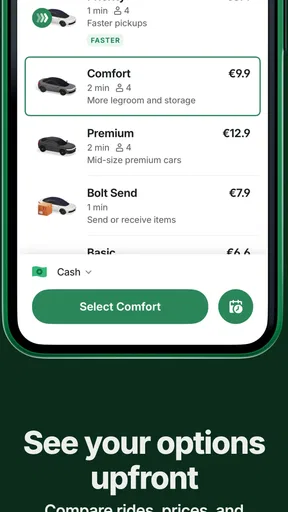
A fare estimate is especially helpful when deciding between a ride and another option, but I would not build a tight budget around it without considering the whole trip. Think about whether the ride saves enough time or effort to justify the cost, and remember that a comfortable car journey is not automatically the best value for a short, well-served route. For people who use ride-hailing occasionally, that quick comparison can prevent an impulse booking; for regular riders, it can help make transport costs more intentional.
Riding Experience
When it comes to the riding experience, Bolt doesn’t disappoint. The drivers I encountered were friendly and professional. You can even track your driver in real-time, so you’re not left wondering when they'll show up. Plus, the in-app chat feature allows seamless communication if you need to give the driver specific instructions.
Real-time tracking is most valuable before pickup: it lets me judge when to head outside and helps avoid waiting on the pavement for longer than necessary. I still leave a little margin, because a moving marker does not remove the possibility of traffic, a hard-to-find entrance, or a last-minute change in the pickup situation. If I’m travelling with someone else, agreeing on one clear meeting point before the car arrives is often better than sending several conflicting messages.
For an everyday trip, I’d use the chat for concise details rather than a long explanation: for example, which entrance I’m waiting by or which side street has a safe stopping place. The feature can clarify the handoff, but it cannot fix a pickup point that is inaccessible or confusing. Choosing a sensible location first is the better solution, with messaging as a backup.
Payment Options
Another thing I love about Bolt is the flexibility with payment options. Whether you’re a cash lover or prefer the simplicity of card payments, Bolt has got you covered. I personally prefer using my card for that quick and cashless experience.
That flexibility is helpful if different people in a household have different payment habits, or if I want to avoid handling cash during a quick trip. I would still check the payment method shown for the ride before confirming, especially if I’m relying on one particular way to pay. A useful routine is to make that check while reviewing the fare, not when the car is already waiting.
For a shared outing, it is also worth agreeing in advance who is arranging the ride and how the cost will be handled. The app makes requesting transport straightforward, but it does not remove the small coordination decisions that can cause friction among friends. Keeping the booking and payment plan clear helps the trip start calmly.
Safety First
Safety is a big deal for me, and I was pleased to see that Bolt takes it seriously. The app provides info about the driver and the vehicle, and you can share your ride details with friends or family so they can track your journey in real-time. Talk about peace of mind!
I treat those tools as practical checks rather than guarantees. Before getting in, I compare the arriving vehicle and driver details with what the app displays. If anything does not match or the pickup feels wrong, I would pause and reassess instead of letting the pressure of a waiting car make the decision for me. Sharing trip details is another useful step when travelling alone, particularly if someone is expecting me at the other end.
These habits are relevant for night travel and unfamiliar neighbourhoods, but they are useful during ordinary daytime trips too. I like that I can let a trusted person follow the journey without having to send repeated updates. At the same time, I remain responsible for choosing where to wait and for paying attention to the journey; an app’s safety tools support good judgement rather than replacing it.
Who should choose it—and who may prefer something else
Bolt is best suited to people who are comfortable booking transport on a phone and want a car option for occasional or regular trips. It can be particularly handy when carrying bags, travelling with another person, or making a journey where the last stretch on foot would be inconvenient. Someone who values seeing the driver’s approach and having pickup communication in the same place may find it easier than arranging a conventional cab by phone.
I would not make it my default for every commute. If a direct bus or train is reliable and the journey is easy to plan, public transport is often the more sensible choice. If I have limited mobile access, prefer to arrange a ride by speaking with a person, or need a highly predictable pickup in a place with few drivers, a phone-booked taxi or another established transport plan may suit me better. The best option depends on the route, not on loyalty to one app.
The app is free to download and is rated for Everyone. It has a 4.8 average from around 9.4 million ratings, with over 100 million installs, which suggests that it has broad reach; those figures do not tell me what availability will be like on a particular street at a particular time. I would judge it by whether it serves the places I actually travel and whether its available rides fit my budget and routine.
Version, compatibility, and the final call
On Android, the listed minimum requirement is version 5.0, and the current version is CA.191.1. Bolt first appeared on July 19, 2013, and its scale reflects how established the service has become. I see that history as useful context, not a reason to assume every feature or experience will be identical from one location to another. For someone deciding whether to install it, the practical question is whether ride-hailing is useful for their everyday routes.
Wrapping it up, Bolt: Request a Ride is a reliable and convenient option for anyone who needs to get around without the hassle of public transport or the expense of traditional cabs. Whether you're rushing to a meeting or heading out for a night on the town, Bolt has you covered. So next time you're in a pinch, give it a whirl and see for yourself. You might just find that it makes your life a whole lot easier.
My recommendation is more specific: keep it as a convenient car-booking option if the service is useful where you live, but compare each trip with transit and other choices rather than assuming a ride is always best. Its strongest value is reducing the effort of arranging a pickup and giving you useful information while you wait. If that matches the journeys you make, it earns a place on your phone; if not, a familiar bus route or a conventional taxi may serve you better.
Pros
- User-friendly interface
- easy to navigate.
- Affordable fares compared to competitors.
- Quick response time for ride requests.
- Multiple payment options available.
- Safety features enhance rider security.
Cons
- Limited availability in some regions.
- Occasional surge pricing during peak times.
- Driver ratings can be inconsistent.
- App occasionally crashes or freezes.
- Support response can be slow at times.
FAQs for Bolt: Request a Ride
What is Bolt: Request a Ride and how does it work?
Bolt: Request a Ride is a convenient ride-hailing app available for Android and iOS. It allows users to quickly and easily book a ride with a nearby driver through the app. Users simply set their pickup location and destination, choose a ride option, and confirm the request. A driver then picks them up and takes them to their desired location.
How safe is it to use Bolt for rides?
Bolt prioritizes safety by implementing several measures, including driver vetting processes and in-app safety features. Drivers undergo background checks and must meet specific criteria before joining the platform. Additionally, the app includes features like driver ratings, SOS buttons, and real-time tracking to ensure a secure and reliable experience for passengers.
What payment methods does Bolt accept?
Bolt offers a variety of payment methods to cater to different user preferences. Passengers can pay for their rides using cash, credit or debit cards, and in some locations, digital wallets. Users can easily manage their payment methods within the app, ensuring a seamless and flexible payment experience.
Are there any additional fees when booking a ride with Bolt?
Bolt is transparent about its pricing, and fares are calculated based on distance, time, and local pricing policies. While there might be additional fees during peak hours or busy areas, the app provides an upfront fare estimate before booking. This ensures users are informed about the cost before confirming their ride.
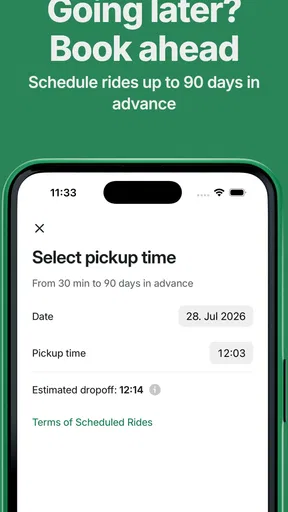
Can I schedule rides in advance with Bolt?
Currently, Bolt does not offer the option to schedule rides in advance. It operates on an on-demand basis, meaning users need to request a ride when they are ready to travel. This approach helps ensure availability and minimizes wait times, providing users with a quick and efficient ride experience.


